Teaching AI How I Work
I started where most developers start with AI. One terminal, one AI, and the potential hiding behind that black and white. I was trying different approaches, different tools, seeing how much of the hype I could actually realise. One of the first things I started doing was saving my prompts. As I used them, I’d write them down in markdown files, particularly the ones I noticed using over and over. I’d started using voice typing too (WIN + H), which sped up non-routine requests.
Along the way, I started picking up on quirks. Things I didn’t expect. The AI would nail something complex, then butcher something simple. It would confidently rewrite a file I didn’t ask it to touch. It would solve a problem three different ways across three attempts, all valid, but fell short in some way. The more I used it, the more I realised the tool wasn’t the problem. It was how I was pointing it.
That realisation, plus a growing suspicion that I might just be doing busy work, pushed me to look at this more seriously.
Directing, Not Hoping
I noticed a lot of developers, myself included, treat AI like a context-aware Google. My early prompts were basically “fix this, no errors please” and hoping for the best. And sometimes it worked. But for existing codebases, there’s a massive gap.
If you’ve been working in a codebase for years, you already know where things live, how they connect, what the quirks are. You can hold that context effortlessly. The AI can’t. It needs you to describe what’s there, how it plugs together, what the conventions are. For experienced developers especially, there’s an adjustment: you have to externalise knowledge you’ve never had to explain before.
For less experienced developers or greenfield projects, this is less of a problem. The AI has seen every public repo, every tutorial, every Stack Overflow answer. Give it a blank canvas and it’s impressive. But most of us don’t have a blank canvas.
This Isn’t Greenfield
Every AI coding demo you see online loves a blank canvas. Spin up a new project, let the AI freestyle, ship something that looks impressive in a tweet. Greenfield is easy mode for vibe coding.
But try that in a 150-project monolith with orchestrated containers, platform-specific dependencies like IIS, and build pipelines customised beyond recognition. Documentation that’s more of a historical curiosity than a guide. Bespoke frameworks that nobody documented because the developer who wrote them retired years ago.
Nobody can vibe code a replacement for systems that have been running for 30 years. These applications get chipped away at, story by story, sprint by sprint. Getting AI to work effectively in these environments takes consideration, and a willingness to chip away at it bit by bit.
Formalise What You Already Do
Chipping away bit by bit. That’s exactly what formalising your process looks like. Document what you do, introduce it to the AI gradually, and refine as you go.
This is where most developers stall. Not because they can't do it, but because it feels like overhead. Writing down what you already know feels redundant, until you realise the AI doesn't know any of it.
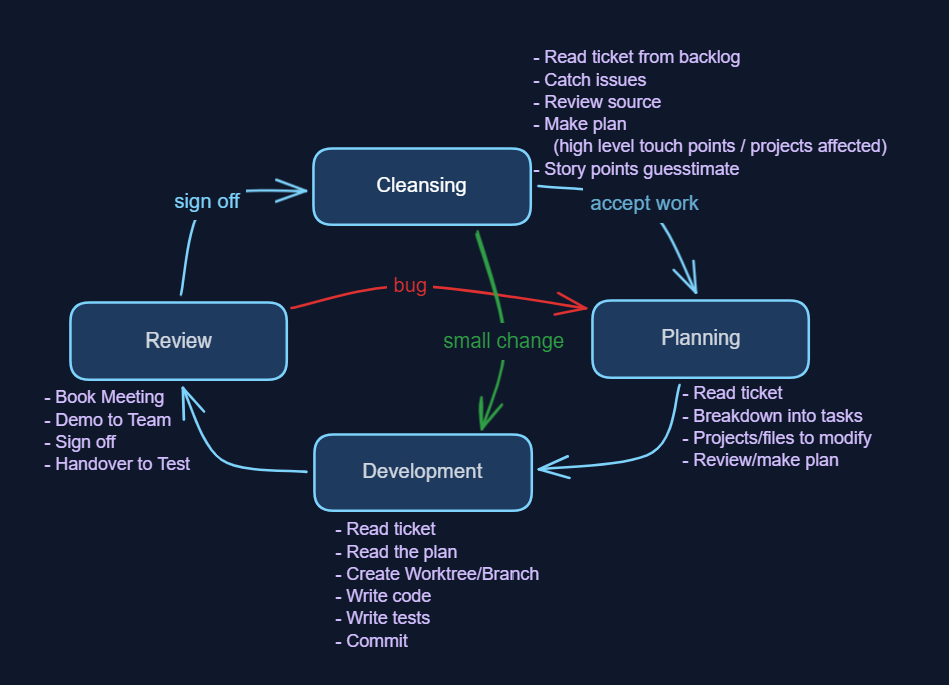
For me, that looks something like this:
- Cleansing: BAs present stories, devs ask questions, catch logical inconsistencies, check feasibility in source code, work out how many layers and areas are touched, then estimate effort
- Planning: look at the source, identify affected areas (front-end, API/DTO, back-end, connected systems, pipelines), go a layer deeper into what needs to change where, break the story horizontally into tasks
- Development: read the plan, read the ticket, write code, write tests, commit in small chunks
- Review: show the BA, get sign-off, hand to test. Passback loop if needed (back to planning)
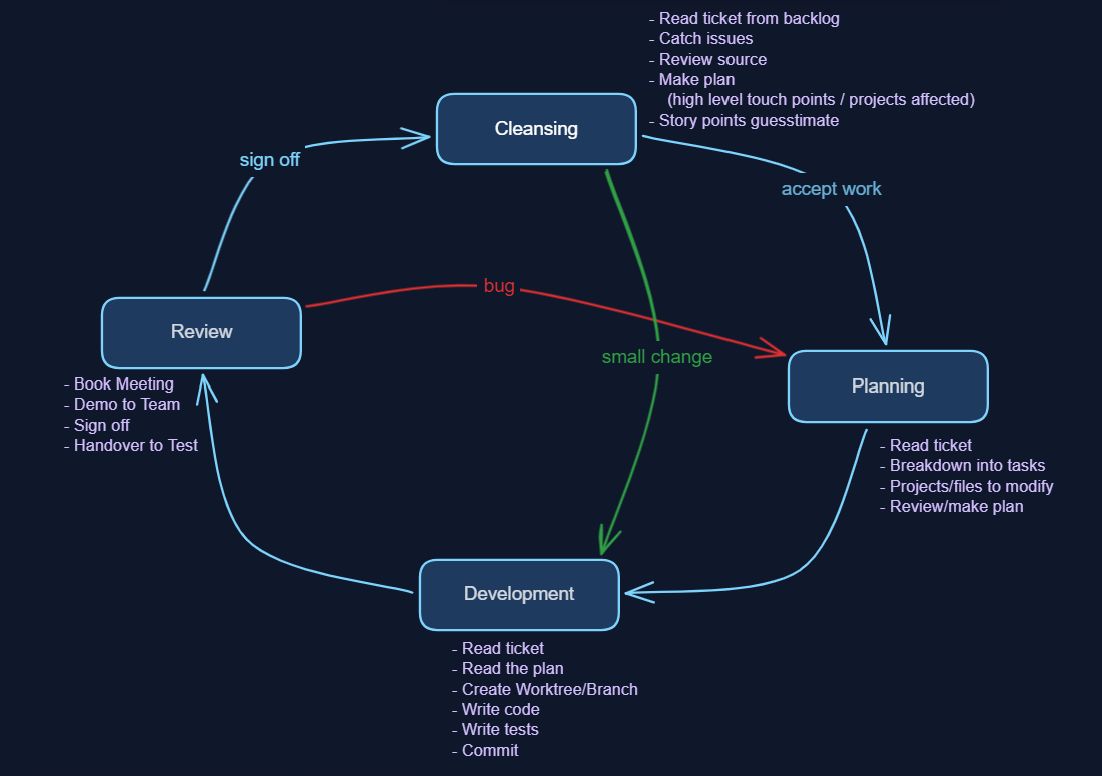
Within each of those phases, there are inner procedures: how to name branches, how to commit, where to get ticket info, how to run tests. The outer process is the same everywhere. The inner procedures are local, per project. Running tests in one project might mean spinning up Docker containers. In another, it’s standing up .NET apps.
The more I describe the process, the better the results I’m getting. So the approach I’m following is this: every condition, action and next step I’m documenting and feeding back into my skills, my agent files, my configuration. If I can’t describe what I do, I can’t delegate it.
You’ll find yourself doing this naturally anyway. You’ll notice that writing certain things at certain points gets good output, especially during development. Eventually you add it to your CLAUDE.md or Copilot instructions: “when writing code, also write tests.” That’s formalisation happening in real time.
From Prompts to Skills
Once I had these external prompts I was customising and pasting in, the next step was making them easily reusable and more streamlined. The first trigger was simple: I stopped copy-pasting the backlog ticket into the terminal. I made an MCP that fetches the data and a skill that references it at the right time.
Each time you repeat a skill, you find what it did well and what it didn’t. Push what works, fence in what doesn’t. A skill that tackles the same problem, the same way, with compounding improvements. Every refinement pays forward to future uses.
As I continuously improve my skill files, they’re getting better each time. That’s what’s freeing me from the minute detail. Not a specific framework or AI model, but the accumulated refinements in how I direct the work. It frees me to think at a higher level, grafting bigger components together rather than chipping away inside each individual task.
The Skill Hierarchy
Over time I’ve collected a formidable list of skills that all fit inside each other. It’s a dependency tree, not a flat list. Planning calls for the backlog ticket. So does development. Both dev and test use the commit skill. A sort of hierarchy emerges, but it isn’t clean. Each skill defines what it does, what it expects as input, what it should output.
The Cross-Cutting Problem
So I’ve got my four different AIs: Claude, Copilot, Codex, Gemini. I’ve got global skills and per-repo skills. I’ve got CLAUDE.md files, both global and per repo. I’ve got my gitignore stealth deployment strategy, which makes worktree management trickier. And then back-feeding improvements across all of this feels like it needs a system of its own.
I already had prompt documents that any AI could follow. But baked-in skills need AI-specific formats. The solution: keep the skill as a portable source, then compile it into each AI’s format. Think of it like writing TypeScript that compiles to JavaScript. The source is yours, the output is theirs.
Portability matters more than you think. If Claude falls off the way ChatGPT did for me, you’re still mobile. Plug in another compiler. Try across them easily.
Enterprise stealth deployment
I created a global gitignore to hide these files so they don't get in the way of anybody else's AI use. I can maintain my own personal AI configuration until I've proven some benefit. Stealth deployment. No committee required.
SDP: The Organiser
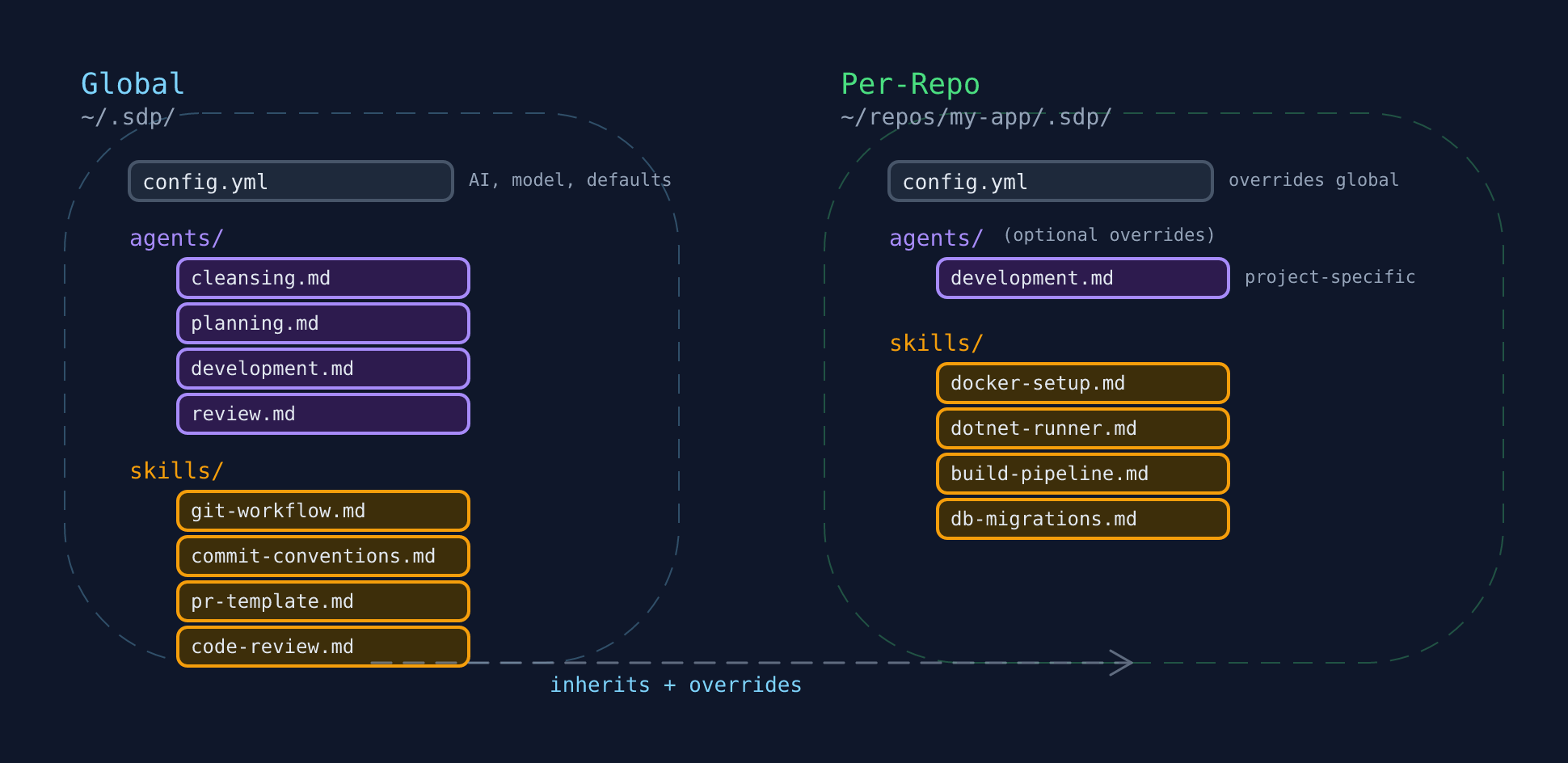
So I built a thing. I call it SDP, as in Software Development Process. It’s not perfect, but it’s a start on being able to manage the growing web of skills, configurations, and AI-specific files across everything I work on.
One framework to manage skills across projects and tools. A single place to update, where improvements cascade everywhere. It’s not the thing doing the work. It’s the thing keeping the thing that does the work manageable.
It splits into two layers: a global config (~/.sdp/) that holds shared skills and conventions, and a per-repo config (.sdp/ in each project) that adds project-specific skills and overrides. Repo wins over global, but inherits everything it doesn’t replace.
I’m planning to release it as open source alongside a follow-up post that doubles as documentation. For now, what matters is the concept: you need something that sits above your skills and manages where they go, how they compile, and how they stay in sync.
Stay in the Native UI
One more thing I feel opinionated about: staying within the native terminals for each AI is important, at least right now.
There are wrappers out there. Gas Town, Claude Squad, and others that orchestrate multiple agents. They’re interesting and powerful in their own right. But the AI landscape is moving fast. New features land constantly, and not all tools implement them at the same pace. Being close to the metal means you can pull in new capabilities as they appear. If you abstract yourself away from the terminal, you risk missing features that could change how you work.
Additionally, Anthropic explicitly says don’t wrap Claude Code outside the SDK in their terms of service. Not only could you get kicked off, but beyond the legal bit: if you step away from the native UI too long, it innovates beyond what you know. You lose the chance to improve and step up yourself. You miss out on the TUI goodness that each AI provider is innovating, the various helpers and pointers it gives along the way.
The Result
The structured approach to brownfield development has significantly reduced the time I spend fixing AI-induced regressions. I’m moving from the weeds of truthy and falsy values to the architecture of the system. Less typing, more thinking.
My two biggest improvements so far have come from learning git worktrees and documenting in markdown how I make commit messages or branch names. That’s allowed me to build up a plan which AI was great at anyway, and let it action the plan more autonomously.
I’ve been tracking every story now in realtime since January. Looking at the broad average, I’m seeing about a 1.3x improvement in overall velocity. But in specific windows where the stories were well-defined and the skills were dialled in, my velocity on story points is peaking at 300% my average.
And while right now, I might not be a 10x developer.
It’s starting to look promising.
This is part of the Using AI to Become a 10x Developer series. Previously: The Moment AI Clicked For Me and How Do You Measure a 10x Developer?
Comments